Programmatically managing IBM DOORS Baselines using DXL
Table of Contents
In IBM Rational DOORS, maintaining a historical record of requirement evolution is crucial for project integrity. This tutorial explores the programmatic management of Baselines and Baseline Sets using DXL.
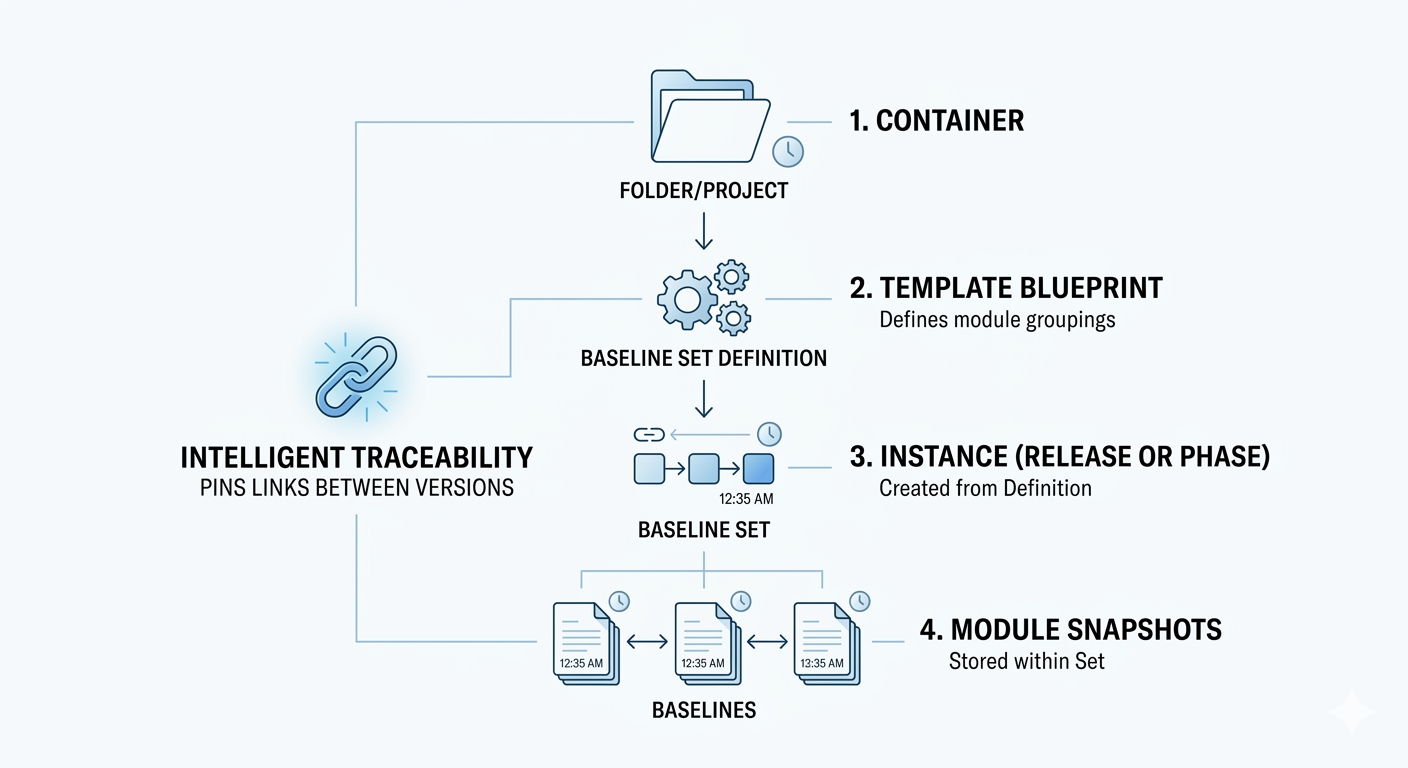
1. Concepts and Relationships Overview #
Before diving into the code, it is essential to understand the hierarchy and relationships between these data structures:
- Baseline: A read-only snapshot of a formal module at a specific point in time
- Baseline Set: A group of baselines treated as a single unit for project planning and management
- Baseline Set Definition (BSD): A template or blueprint stored in a folder or project that defines which modules should be included in a Baseline Set
- Intelligent Traceability: The mechanism that pins links between specific module versions when they are part of the same Baseline Set
The Relationship Hierarchy #
- Folder/Project contains the Baseline Set Definition
- Baseline Set Definition defines which modules belong together
- Baseline Set is an instance (a specific release or phase) created from that Definition
- Baselines are the individual snapshots of modules stored within that Baseline Set instance
2. Standard Baselines vs. Intelligent Traceability #
The way links are preserved depends on your baselining strategy:
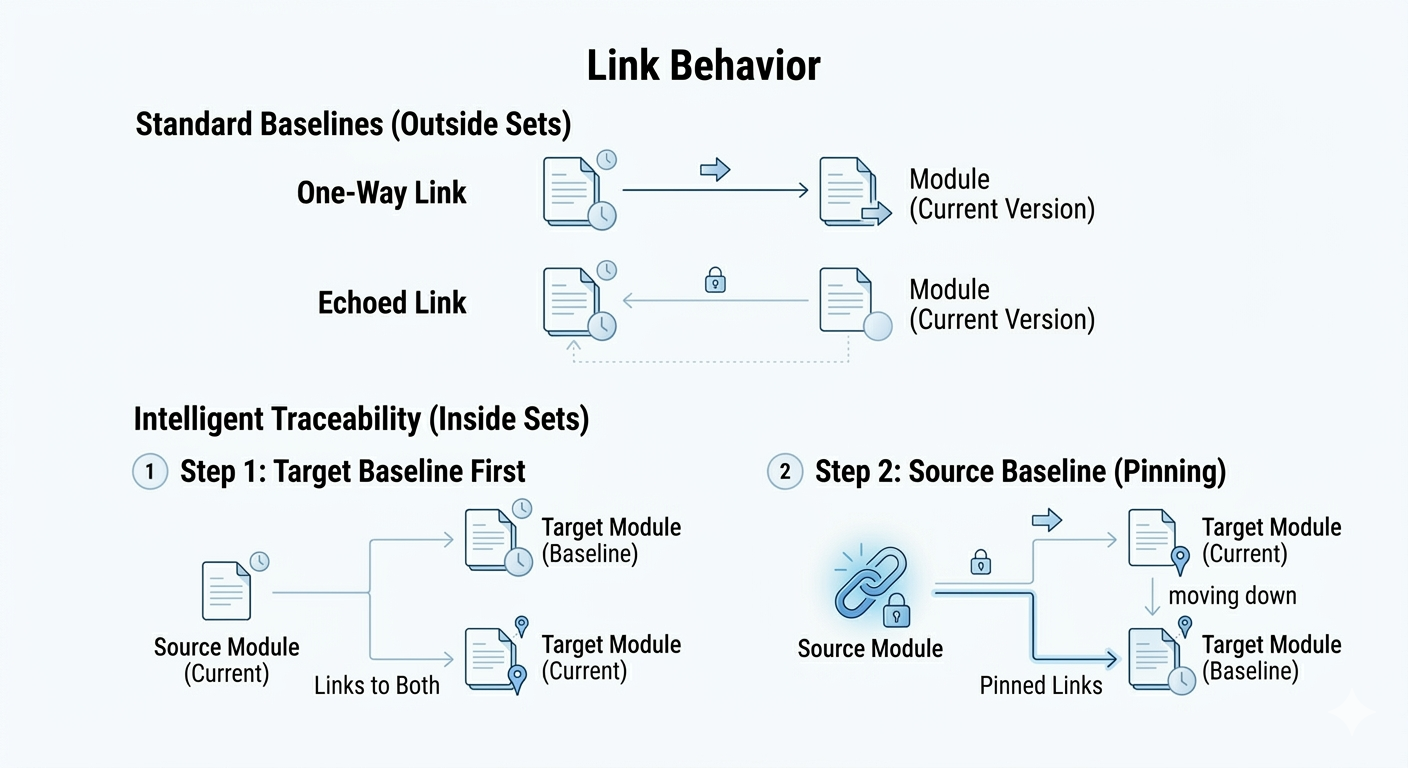
Link Behavior Outside Baseline Sets #
When you baseline modules individually:
- One-Way: Links point from the new baseline to the current version of the target module
- Echoed Links: These are “one-way” outlinks in a baseline that lack a corresponding inlink in the target leading back to that specific historical version [Source History]
Link Behavior Inside Baseline Sets (Intelligent Traceability) #
When modules are baselined as a set:
- Version Pinning: Links are maintained between the specific baselined versions
- Static History: If you baseline the target module first, the source module shows links to both the current and baselined versions. Once the source is also baselined into the set, the link “moves down” to connect the two baselines directly
3. Managing Baseline Sets via DXL #
Programmatically creating a Baseline Set follows a strict multi-step workflow. You must manage the template (BSD) before creating the actual snapshot (Set).
Phase 1: Creating the Blueprint (BSD) #
To group modules for “Intelligent Traceability” where links are pinned between specific versions—you must first create a Baseline Set Definition.
Key Steps: #
- Create: Use the create perm on a Folder or Project
- Lock: You must lock the BSD exclusively before you can add modules or change descriptions
- Populate: Add formal modules using their ModName_ handles
void setupBlueprint(Folder f, string bsdName, Skip modulesToAdd) {
    BaselineSetDefinition bsd = null
    string err = create(f, bsdName, "Template for Release 1.0", bsd)

    if (null bsd) { print "Error: " err; return }

    err = lock(bsd)

    if (null err) {
        ModName_ mn
        for mn in modulesToAdd do {
            addModule(mn, bsd)
        }
        save(bsd)
        unlock(bsd)
    }
}
Phase 2: Instantiating the Set (BS) #
Once your definition is ready, you create an Open Baseline Set.
Key Steps: #
- Lock BSD: You must hold the lock to create a set
- Create Set: Specify major/minor increment and suffix
BaselineSet createReleaseContainer(BaselineSetDefinition bsd, string suffix) {
    BaselineSet bs = null
    string err = lock(bsd)

    if (null err) {
        err = create(bsd, true, suffix, "Release 1.0 Snapshots", bs)
        unlock(bsd)
    }
    return bs
}
Phase 3: The Snapshot (Baselining Modules) #
The final step is the bulk operation addBaselines.
Important: When a module is baselined, Rational DOORS automatically closes that module.
void performSnapshot(Skip modulesToBaseline, BaselineSet bs) {
    BaselineSetDefinition bsd = ...
    lock(bsd)

    string err = addBaselines(modulesToBaseline, bs)

    if (!null err) {
        print "Baselining failed: " err "\n"
    } else {
        print "All modules baselined successfully into set " versionID(bs) "\n"
    }

    close(bs)
    unlock(bsd)
}
Phase 4: Retrieving Information #
After baselining, you can iterate through module history or Baseline Set contents.
Metadata Extraction & Baseline module access #
Module m = current
Baseline b
for b in m do {
    print major(b) "." minor(b) " " suffix(b) ": " annotation(b) "\n"
}
Module m = current
Baseline b
for b in m do {
    print major(b) "." minor(b) " [" suffix(b) "]: " annotation(b) "\n"
}

BaselineSet bs = ...
ModuleVersion mv
for mv in bs do {
    print "Member: " fullName(mv) " Version: " versionString(mv) "\n"
}
Loading a Specific Module Baseline in DXL #
To load a specific version of a module baseline in DXL, you can use the load perm. There are two primary ways to do this: using specific version integers and a suffix, or using a ModuleVersion handle.
Method 1: Using Version Numbers (Major, Minor, and Suffix) #
The most common approach is to create a Baseline handle using version numbers and then call the load function.
// Define the version details
int majorNum = 1
int minorNum = 0
string suffixStr = "alpha" // Use null if there is no suffix

// 1. Get a baseline handle for these specific numbers [1]
Baseline b = baseline(majorNum, minorNum, suffixStr)

// 2. Load the baseline of the current module [2]
// Parameters: (Module, Baseline, Display_Boolean)
Module mBaseline = load(current Module, b, true)

if (null mBaseline) {
    print "Error: Baseline could not be loaded.\n"
}
Method 2: Using a ModuleVersion Handle #
If you are iterating through a Baseline Set or have a ModuleVersion object, you can load the baseline directly.
// Assume mv is a ModuleVersion handle obtained from a loop or reference [3]
ModuleVersion mv = moduleVersion(module "/Project/ModuleA", baseline(1, 0, ""))

// Load the data for this version in read-only mode [4]
// If the second parameter is true, the baseline window will be displayed [4]
Module mBase = load(mv, true)

if (!null mBase) {
    print "Successfully loaded: " (fullName mBase) " [" (versionString mv) "]\n"
}
Key Considerations #
- Handle vs. Data: The baseline perm only creates a handle for use in the load function; it does not retrieve metadata like annotations. To retrieve metadata, you must iterate through the module using a for b in module do loop.
- Implicit Module: If the Module argument is omitted in the load function, DXL defaults to using the current Module.
- Loading Hidden: If you are performing an automated comparison or report, set the display boolean to false to load the module version in the background without opening a new window.
- ModuleVersion vs. Baseline: A ModuleVersion is a reference that can point to either a baseline or the current version, while a Baseline handle is specific to snapshots.