IBM DOORS Links
Linking and traceability in IBM DOORS allow users to build and track relationships between requirements across a project’s lifecycle.
By following these links, you can monitor how changes to one requirement affect others, ensuring project integrity.
1. Key Concepts and Terminology #
To master linking in DOORS, you must understand the distinct roles of the following components: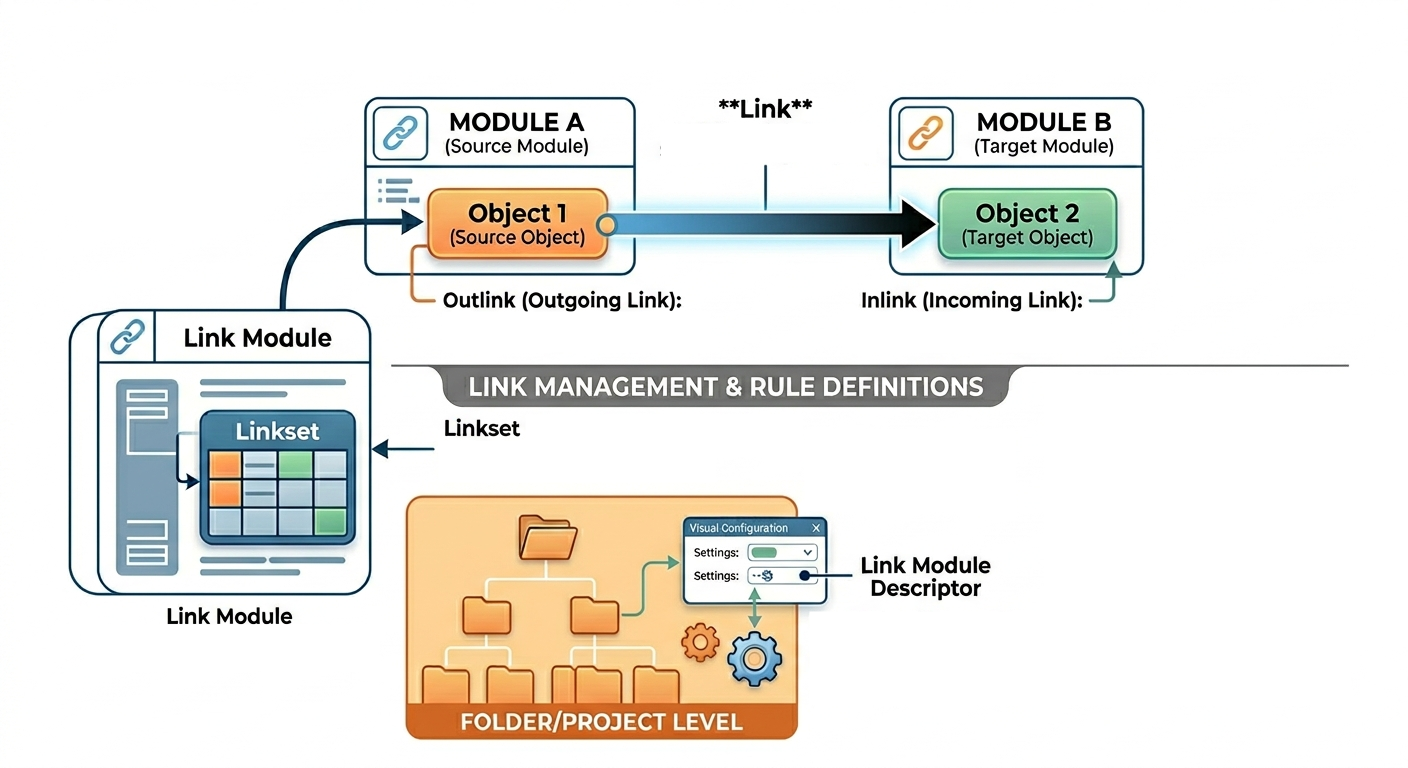
| Concept | Description |
|---|---|
| Link | A relationship between a source object and a target object |
| Outlink (Outgoing Link) | A link viewed from the perspective of the source object, pointing away to a destination |
| Inlink (Incoming Link) | A link viewed from the perspective of the target object, arriving from a source |
| Link Module | A specialized module that does not store actual links, but rather the Linksets that define the rules for those links |
| Linkset | A data structure within a Link Module that defines a relationship between a specific pair of modules (source and target) |
| Link Module Descriptor | A pairing definition set at the folder or project level. It specifies which Link Module should be used for links between specific modules and whether that module is mandatory or overridable |
| LinkRef | A DXL data type representing a reference to a link. It is commonly used when iterating through incoming links |
2. Where are Links Stored? #
A critical aspect of DOORS architecture is asymmetric storage.
Physical Storage #
- Links are physically stored only in the source formal module
Link Module Storage #
- Link modules store the Linksets (the pairings), not the individual link instances between objects
This storage model means that:
- You must have write permission in the source module to create or modify a link
- You can always see outgoing links
- You can only see incoming links if the source module is currently loaded into memory
3. Looping Through Object Links #
Navigating Outgoing Links #
Since links are stored in the source module, outlinks are always accessible.
Link l

for l in (current Object) -> "*" do {
    ...
}
Navigating Incoming Links (The Inlink Trap) #
The standard LinkRef loop only detects links for which the source module is already loaded.
To find all inlinks, including those from closed modules, you must first loop through the source references.
ModName_ srcModRef
LinkRef lr

// 1. Detect all source modules (even if closed)
for srcModRef in (tgtObject <- "*") do {

    // 2. Load the source module hidden (read mode) to make links visible
    read(fullName(srcModRef), false)
}

// 3. Now that sources are loaded, iterate through actual link references
for lr in tgtObject <- "*" do {
    ...
}
4. Filtering Links by Link Module #
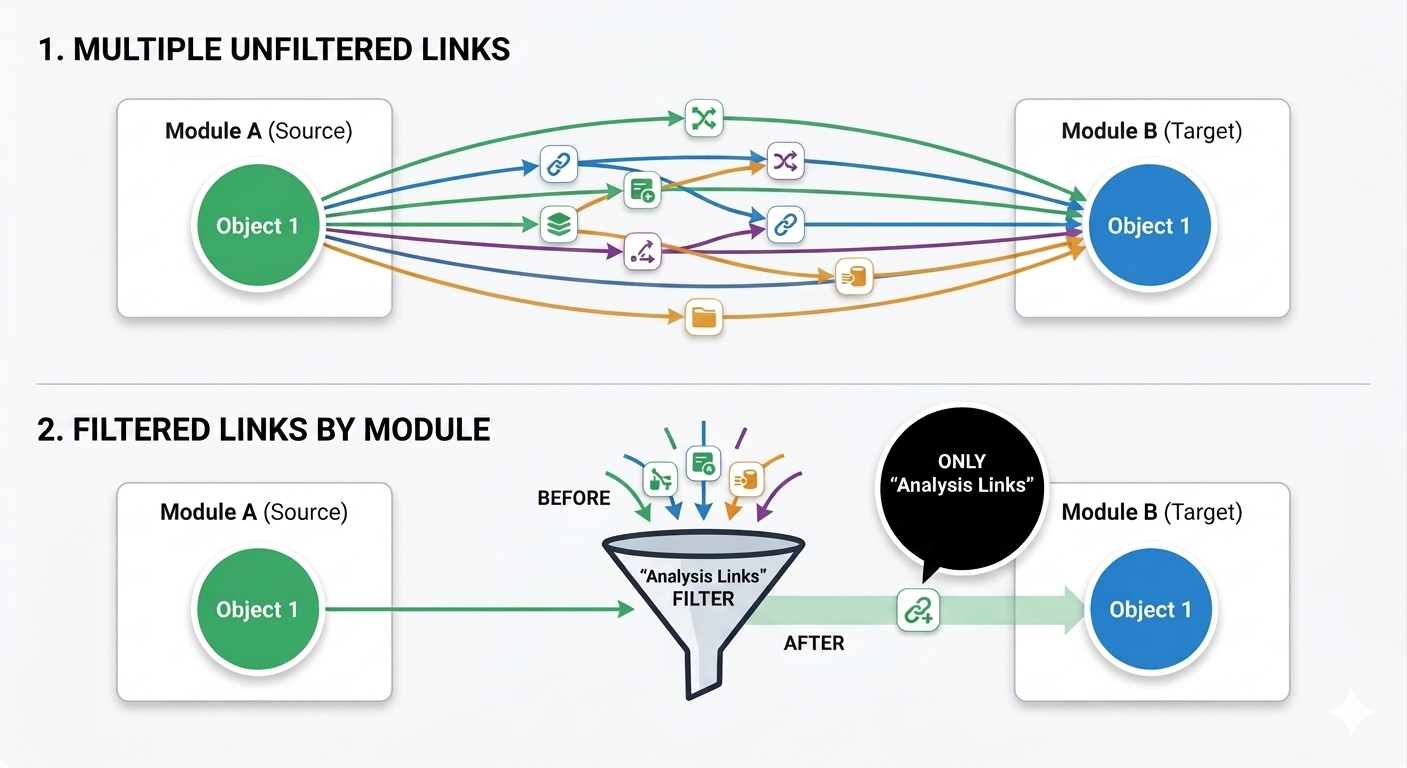
When looping through links in DXL, you can precisely control which relationships are traversed by specifying a Link Module name as a string in the loop syntax.
This acts as a filter, ensuring the interpreter only processes links governed by that specific module.
Specific Link Module vs. Wildcard #
The syntax for both outgoing and incoming link loops includes a string parameter for the link module.
| Syntax | Behavior |
|---|---|
"*" | Iterates through all links regardless of the link module |
"Analysis Links" | Restricts the loop to links belonging only to that specific module |
The Wildcard ("*") #
Using an asterisk as the module name tells DXL to iterate through all links, regardless of which link module they belong to.
Link l

for l in current -> "*" do {
    ...
}
Specific Module Name #
Providing the name of a link module restricts the loop to only those links.
If a Link Module Descriptor exists and is set to not overrideable, users may be forced to use that specific module for certain pairings.
Link l

for l in current -> "Analysis Links" do {
    ...
}
Syntax Examples #
1. Outgoing Links from a Specific Module #
This loop will only find links that point away from the source object through the "System Trace" link module.
Link l
Object srcObj = current

// Only iterate through links in "System Trace"
for l in srcObj -> "System Trace" do {
    ...
}
2. Incoming Links from a Specific Module #
Similarly, when investigating incoming links (inlinks), you can ignore all other relationship types and focus solely on those arriving via a named module.
Note: For inlinks, the source module must be loaded for this specific loop to detect the links.
LinkRef lr
Object tgtObj = current

// Only iterate through incoming links in "Validation Links"
for lr in tgtObj <- "Validation Links" do {
    ...
}
Advantage #
Using specific module names in your loops is a best practice for:
- performance,
- readability,
- and accuracy in large databases.
It prevents your script from accidentally processing irrelevant links such as:
"Change Proposal Links""Drafting Links"- temporary review links
- or unrelated traceability paths.
5. Retrieving Information from Links #
Once you have a handle on a Link object in DXL, you can extract several pieces of metadata using specific functions.
| Function | Description |
|---|---|
source(l) / target(l) | Returns the source or target object handle (if the module is loaded) or module reference |
sourceAbsNo(l) / targetAbsNo(l) | Returns the absolute number of the object at either end of the link |
lastModifiedTime(l) | Returns the date and time the link was last changed |
l."Created By" | Access attributes of the link itself using standard dot notation |
6. Link Module Descriptors & Enforcement #
While any user with write access can technically create a link module, Rational DOORS allows project managers to enforce strict linking rules at the folder or project level through Link Module Descriptors.
The Role of Descriptors #
A descriptor defines a mandatory or preferred link module for a specific pair of source and target modules.
- Overrideable Flag: If a descriptor is set to not overrideable, users are forced to use the specified link module for that module pairing.
- Mandatory Links: This setting ensures that links between the defined modules cannot be omitted during specific operations.
In DXL, you can programmatically manage these pairings using the addLinkModuleDescriptor and removeLinkModuleDescriptor functions.
7. External Links & OSLC Discovery #
Not all traceability exists within DOORS.
External Links provide a one-way relationship to resources outside the formal database, such as websites, files on a network, or other IBM Engineering tools.
- One-Way Nature: Unlike internal links, no corresponding information is created in the target resource
- DXL Handling: External links use the
ExternalLinkdata type. You can iterate through them using specialized loops likefor extLink in (Object o) <-> "" - OSLC Link Discovery: For modern integrations, DOORS uses a database-wide cache to store discovered OSLC links, improving performance when opening modules with many external dependencies
8. Deep Dive: Managing Linksets in Link Modules #
To DXL, a Link Module is a special container where each "Object" is actually a Linkset (a pairing definition).
Converting Objects to Linksets #
When looping through a Link Module, you must explicitly cast the object handle to a Linkset handle to access its properties.
Module lm = current // Assuming this is a Link Module
Object o
Linkset ls

for o in entire lm do {

    ls = linkset(o) // Explicit cast

    if (!null ls) {

        ModName_ targetMod = getTargetModule(ls)

        print "Linkset points to: " fullName(targetMod) "\n"
    }
}
Key Management Perms #
getTargetModule(ls): The most reliable way to identify the destination module of a linkset definitiongetSourceVersion(ls): Retrieves version information for the source end of the linksetside1(Module)/side2(Module): Returns the objects currently selected on the source or target side of a visible link module matrix
9. Practical DXL Link Management Snippets #
Several practical DXL snippets for managing links, ranging from basic inspection to conditional cleanup.
1. Robust Link Counter (In and Out) #
This snippet counts all links for an object.
To ensure an accurate inlink count, it uses the source reference loop to detect links from modules that are currently closed.
Object o = current
int outCount = 0
int inCount = 0
Link l
ModName_ srcModRef

// Count outgoing links (always visible)
for l in o -> "*" do outCount++

// Count incoming links (must check all source references)
for srcModRef in o <- "*" do {

    // This loop identifies every source module, even if closed
    // We increment for each link found once the source is loaded
    if (read(fullName(srcModRef), false)) {

        LinkRef lr
        for lr in o <- "*" do inCount++
    }
}

print "Object " identifier(o) " has " outCount " Outlinks and " inCount " Inlinks.\n"
2. Identifying Link Modules and Attributes #
Links can have their own attributes (e.g., "Created By").
This script loops through an object’s outgoing links and prints:
- the Link Module name,
- the creator,
- the modification time,
- and the target information.
Object o = current
Link l

for l in o -> "*" do {

    // Get the handle of the Link Module governing this link
    Module lm = module(l)

    // Access link-level attributes using dot notation
    string creator = l."Created By"
    Date modTime   = lastModifiedTime(l)

    print "Link in Module: " (name lm) "\n"
    print "  Created By: " creator "\n"
    print "  Last Modified: " modTime "\n"
    print "  Target: " (targetAbsNo(l) "") " in " (fullName(target(l))) "\n"
}
3. Conditional Link Deletion #
This script deletes all outgoing links created by a specific user.
A link deletion only takes effect:
- when the script finishes,
- or when
flushDeletions()is called.
Object o = current
Link l
string targetUser = "John Smith"

for l in o -> "*" do {

    if (l."Created By" == targetUser) {

        print "Deleting link to " (fullName(target(l))) "\n"
        delete(l)
    }
}

// Optional: force the deletion now
// flushDeletions()
4. Checking for Specific Link Existence #
To verify if a link already exists between two specific objects before creating a new one, use this pattern.
bool linkExists(Object src, Object tgt, string linkModName) {

    Link l

    for l in src -> linkModName do {

        if (targetAbsNo(l) == (tgt."Absolute Number") &&
            fullName(target(l)) == fullName(module(tgt))) {

            return true
        }
    }

    return false
}

// Usage
Object s = current
Object t = ... // some target object

if (!linkExists(s, t, "MyLinkModule")) {
    s -> "MyLinkModule" -> t
}
5. Cleaning Up “Ghost” Linksets in Link Modules #
In a Link Module, every "Object" is actually a Linkset definition.
This snippet identifies linksets that no longer point to valid modules.
Module lm = current // Must be a Link Module
Object o
Linkset ls

for o in entire lm do {

    ls = linkset(o)

    if (!null ls) {

        ModName_ tgtMod = getTargetModule(ls)

        if (!exists(tgtMod)) {

            print "Found orphaned linkset definition for: " fullName(tgtMod) "\n"

            // delete(ls)
        }
    }
}
6. Managing Link Module Descriptors #
If you need to programmatically enforce that links between two modules must go through a specific Link Module, use Link Module Descriptors.
Folder f = current

string srcPath = "/Project/Source"
string tgtPath = "/Project/Target"
string linkMod = "/Project/LinkMod"

// Add a mandatory, non-overrideable link requirement
string err = addLinkModuleDescriptor(
    f,
    srcPath,
    tgtPath,
    false,
    true,
    linkMod,
    "Enforced Traceability"
)

if (!null err)
    print "Error: " err "\n"
else
    print "Link Descriptor added successfully.\n"